Instagram DM Meaning: What DM Stands For and How DMs Work
Instagram DM meaning: DM stands for Direct Message, a private chat in your inbox. Where to find DMs, what Seen and Requests mean, and DM rules for brands.
 Aanchal
Instagram DM meaning: DM stands for Direct Message. It is a private chat on Instagram between you and one person (or a small group) that nobody else can see. When someone says "DM me" or "check your DMs", they mean the paper-plane inbox at the top right of your Instagram feed, not a comment or a Story.
That is the short answer. The rest of this guide explains where DMs live in the app, what words like "Requests", "Seen" and "General" mean, how DMs differ from comments, and how creators and businesses in India use them to get leads.
What Does DM Mean on Instagram?
DM is short for direct message. On Instagram it means any private message sent through the app's messaging feature, often called the inbox or Messenger. You can send text, photos, videos, voice notes, Reels, posts, Stickers and links in a DM.
The word is used as a noun and as a verb:
- Noun: "I got a DM from a brand." (a message)
- Verb: "DM me for the price." (send me a message)
- Plural: "Check your DMs." (your inbox)
- Slide into DMs: slang for messaging someone you don't know well, usually to start a conversation.
In Hinglish you will often see "DM karo", "DM mein bhejo" or "inbox check karo". All of them mean the same thing: send or read a private Instagram message.
Where to Find Your DMs on Instagram
Open the Instagram app and tap the paper-plane or Messenger icon at the top right of your home feed. That opens your chat list. On a computer, go to instagram.com and click Messages in the left menu.
Inside, the inbox is split into folders. What you see depends on your account type:
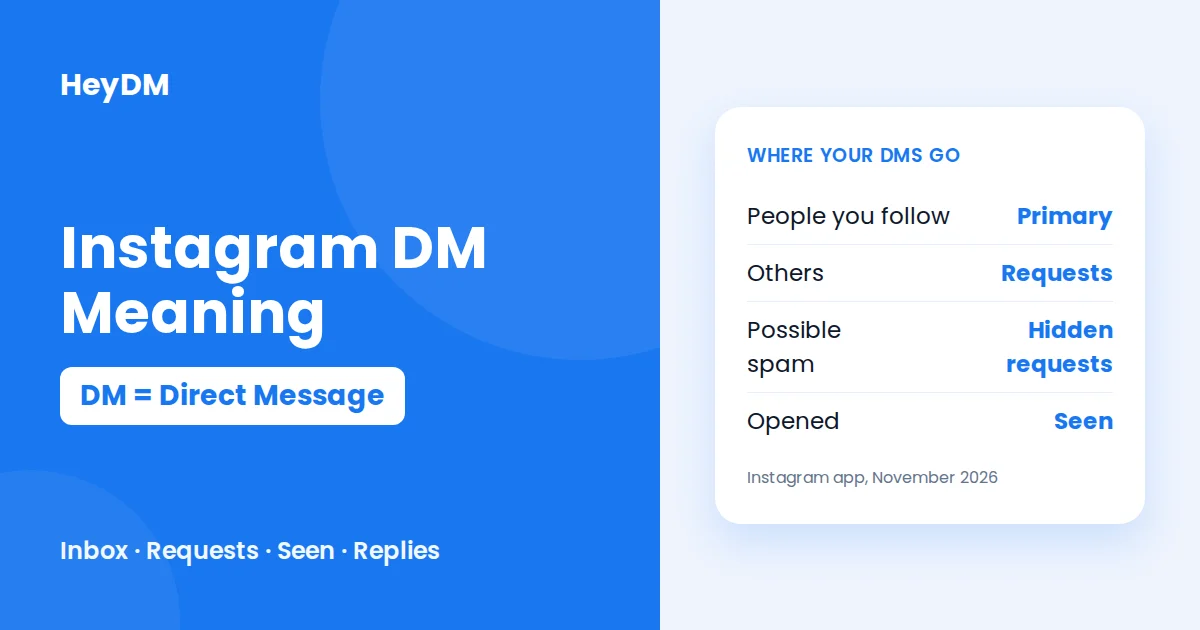
| Folder | What goes there | Who sees it |
| Primary | Your main chats: people you follow and requests you accepted. Notifications are on. | Everyone (on professional accounts it sits next to General) |
| General | Accepted chats you want to keep without constant notifications. | Creator and Business accounts |
| Requests | Messages from people you don't follow. They can't see if you read them until you accept. | Everyone |
| Hidden requests | Requests Instagram's filters think may be spam or offensive. | Everyone, inside Requests |
If you are expecting a message and can't find it, check Requests first, then Hidden requests. This is the most common reason people think a DM "never arrived".
Send your links by DM, automatically
HeyDM replies to every comment with your link, on Meta’s official API.
14-day free trial, then $9.99/month or $99/year. Cancel anytime.
DM vs Comment vs Story Reply
New users often mix these up. Here is the difference in one table:
| DM | Comment | Story reply | |
| Who can see it | Only the people in the chat | Anyone who can see the post | Only you and the Story owner |
| Where it appears | Inbox | Under a post or Reel | Inbox, with a preview of the Story |
| Good for | Prices, orders, private questions | Public reactions and questions | Reacting to something temporary |
| Example | "Is the blue kurta in size M?" | "Love this colour!" | "Where is this café?" |
A Story reply is technically a DM: it lands in the same inbox. That is why a quick reply to someone's Story starts a private conversation, not a public one.
Common Instagram DM Terms and What They Mean
Instagram's inbox has its own vocabulary. These are the terms people search for most:
| Term | Meaning |
| Seen | The other person opened your message. It shows under your last message if read receipts are on. |
| Sent / Delivered | Your message left your phone but hasn't been opened yet. |
| Active now | The person is using Instagram at that moment, if they share their activity status. |
| Message request | A first message from someone you don't follow, waiting for you to accept or delete it. |
| Vanish mode | A chat mode where messages disappear after they are seen and you leave the chat. |
| Reactions | Double-tap or long-press a message to add an emoji, like a heart. |
| Reply / swipe to reply | Swipe right on a message to quote it in your answer. |
| Unsend | Long-press your own message and remove it for everyone in the chat. |
| Notes | Short status lines that show at the top of the inbox for 24 hours. |
Instagram keeps adding inbox features, such as editing a sent message for a short time, pinning chats and scheduling messages. The exact options depend on your app version and region, so update the app if you don't see one.
How to Send a DM on Instagram (Step by Step)
- Tap the paper-plane / Messenger icon at the top right of your feed.
- Tap the pencil icon (new message) at the top right.
- Search for the person's username and select them. Pick more than one person to start a group chat.
- Type your message, or tap the camera, gallery or microphone icon to send media or a voice note.
- Tap Send.
You can also send a DM from someone's profile: open the profile and tap Message. To share a post or Reel by DM, tap the paper-plane icon under the post and pick a chat.
Who Can DM You (and How to Control It)
By default, anyone can send you a message request, but only people you follow land straight in your main inbox. You can tighten this in Settings and privacy → Messages and story replies → Message controls. There you can choose who can message you, who can add you to groups and whether requests from people you don't follow are allowed at all.
If someone is bothering you, open the chat, tap their name and choose Restrict, Block or Report. Restrict is the quiet option: their messages move to Requests and they can't see when you are online or whether you read them. Instagram explains each control in the Instagram Help Centre.
Why "DM Me" Is Everywhere on Business Accounts
Scroll Instagram in India for five minutes and you will see "DM for price", "DM to order" or "Comment LINK and I'll DM you". There are three reasons sellers and creators push people into DMs:
- Privacy: customers ask about price, size, address and payment, which they don't want in public comments.
- Conversion: a one-to-one chat feels personal, and a link sent in a DM is one tap away from the buyer.
- Reach: comments and DM activity tell Instagram people are interested, which can help the post.
The catch is volume. A Reel that takes off can bring hundreds of "price?" comments and DMs in a day. Replying by hand takes hours, and buyers who wait too long move on. This is where many accounts start using comment-to-DM automation: someone comments a keyword, and a DM with the link goes out automatically.
Instagram DM Rules Every Business Should Know
If you message customers from a business or creator account, Instagram's rules for messaging tools apply:
| Rule | What it means in practice |
| The customer messages first | Official tools can only reply to people who commented, replied to a Story or sent a DM. No cold DMs to strangers. |
| 24-hour window | After someone messages you, a tool can keep the conversation going for 24 hours from their last message. |
| One private reply per comment | A comment can trigger one automatic DM, sent within 7 days of the comment. |
| Professional account | Automation through Meta's API needs a Creator or Business account, not a personal one. |
We explain these limits in detail, with safe numbers, in our guide to Instagram DM limits.
Automating Replies to Your DMs
If the same three questions fill your inbox every day, you can set up automatic answers. Instagram itself offers saved replies and a simple instant reply for professional accounts. Tools built on Meta's official API go further: a keyword like PRICE or MENU gets its own saved answer, comments on a Reel trigger a DM with your link, and Story replies get an instant response.
HeyDM, the tool we make, is one of these. It connects through Instagram Login, never asks for your password and paces replies with Smart Safe Mode. It costs ₹419/mo in India or ₹333 a month billed yearly, with a 14-day free trial and no free plan. See how keyword replies work on our Instagram auto reply page, or borrow wording from these auto-DM templates.
Messages not arriving at all, or the inbox won't load? Our step-by-step guide to Instagram DM not working covers outages, cache, account limits and blocked chats.
If your DM shows a red "!" instead of Sent or Seen, it never left your phone. Here is why Instagram says "message not sent" and how to fix it.
FAQ
What is the full form of DM on Instagram?
DM stands for Direct Message. It is a private message sent through Instagram's inbox, visible only to the people in that chat.
What does "DM me" mean?
It means "send me a private message on Instagram". On business accounts it usually means you will get the price, link or details in the chat instead of in the comments.
Can other people see my Instagram DMs?
No. Only the people in the chat can see the messages. If you send a screenshot or share the chat, that is a different matter, so be careful with personal details.
Why can't I find a DM someone sent me?
Check Requests and Hidden requests. Messages from people you don't follow go there first, and Instagram's filters move possible spam into Hidden requests.
What does Seen mean in Instagram DMs?
Seen means the other person opened your message. If they have turned off read receipts, or if your message is still a request, you won't see it.
Is a Story reply a DM?
Yes. When you reply to someone's Story, the reply arrives in their DM inbox with a small preview of the Story.
Can I send automatic DMs on Instagram?
Yes, from a Creator or Business account, using Instagram's own saved replies or a tool on Meta's official API. Automatic DMs can only go to people who messaged, commented or replied to your Story first.