Instagram DM Limits in 2026: Safe Automation Rules Nobody Explains
Instagram's DM limits in 2026, explained: the numbers that matter, what gets accounts blocked, and how to automate safely.
You set up your comment automation, post a Reel, watch 300 comments roll in — and then suddenly, nothing. DMs stopped. No error message. No warning. Just silence. 👀
Congratulations. You just hit Instagram's DM limits. And you're not alone — plenty of creators hit this wall without knowing it existed. The frustrating part isn't the limit itself. It's that Instagram barely documents it, most automation tools don't warn you about it, and almost nobody talks about what the actual rules are. Tools like HeyDM are built around these limits so your account stays safe automatically — but even if you're using the right tool, understanding these limits will make you a smarter creator.
So let's break it all down. Every limit. Every rule. Every number. 👇
📌 Quick Summary — The Numbers
- New accounts: 20–50 manual DMs per day
- Established accounts: 50–150 manual DMs per day
- API automation (official tools): Meta allows 750 comment replies per hour; many tools cap themselves lower (often around 200)
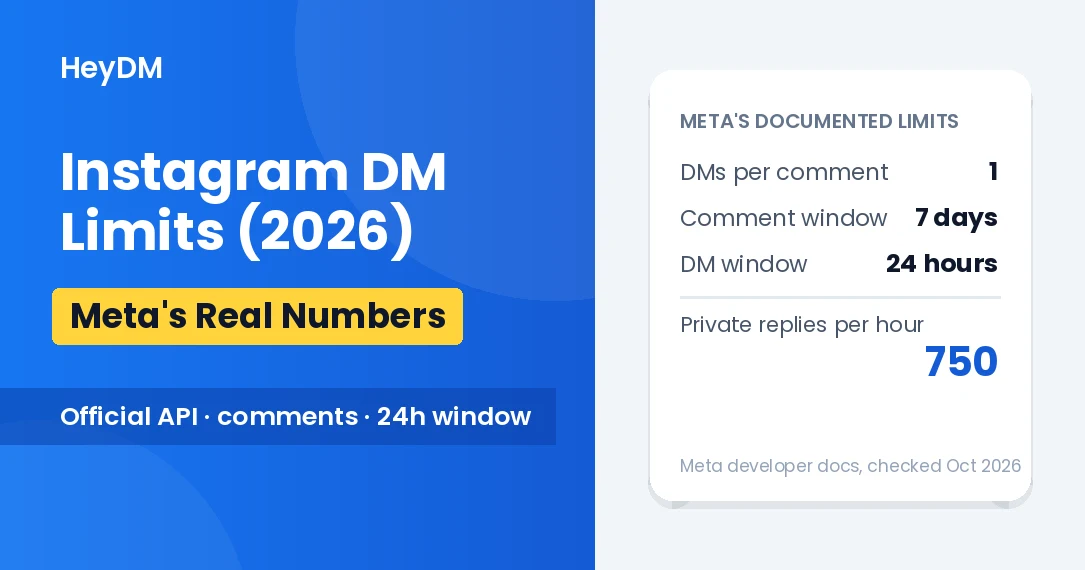
- Reply windows: one private DM per comment, sent within 7 days of the comment; once someone messages you, 24 hours from their last message
- Message character limit: 1,000 bytes per DM (emojis and Hindi text use more than one byte per character)
- Getting blocked: often a 24–48 hour DM block for a first offence (creator reports; Meta doesn't publish durations)
First, There Are Two Completely Different Limit Systems 🔀
Most people don't know this, but Instagram has two separate sets of DM limits that work completely independently of each other. Mixing them up is what causes most of the confusion.
System 1: Manual DM limits. These apply when you're sending messages yourself, directly through the app. These limits are not publicly documented by Meta — they vary based on your account age, history, and what Instagram calls your "trust score."
System 2: API automation limits. These apply when an official tool (like HeyDM) sends DMs on your behalf through Meta's official Graph API. The main ones are published in Meta's developer documentation and are the same for every professional account, whatever its size.
The good news? API automation limits are actually higher than manual limits in some situations — because Meta wants businesses to use their official system. More on that below.
Manual DM Limits: What Instagram Allows Per Day 📊
Here's the honest breakdown. Instagram never officially publishes these numbers, but based on what creators and developers have documented consistently across 2026:
🐣 New Account → 20–50 DMs/day → ⚠️ High Risk (red number)
📈 Established → 50–100 DMs/day → 🟡 Medium Risk (orange number)
✅ Trusted → 100–150 DMs/day → 🟢 Lower Risk (blue number)
🏢 Verified/Business → Up to 200 DMs/day → 🟢 Lowest Risk (green number)
⚠️ The Trap Most Creators Fall Into
Your limit isn't fixed — it changes based on your behavior. Send too many DMs to cold accounts (people who don't follow you), get a high block rate, or suddenly spike your DM activity after weeks of low activity — and Instagram will quietly lower your limit. You won't get notified. Your DMs will just start getting blocked.
API Automation Limits: The Official Numbers 🤖
This is where it gets interesting. When you use an official Meta API tool for DM automation, the limit structure is completely different — and much more predictable.
⏱️750 Comment replies per hour
Meta's documented limit for private replies to comments on posts and Reels, per professional account. Many tools set a lower cap of their own (around 200 an hour is common) to keep activity looking natural.
🕐7 days To reply to a comment
A comment can get its private DM up to 7 days after it was posted. Once the person writes back, you have 24 hours from their last message to keep the conversation going.
✉️1 Private DM per comment
Each comment can trigger one private reply. The conversation only continues if the person replies.
📝1,000 Bytes per message
Plain English is about one byte per character, but an emoji takes 4 bytes and a Hindi character 3, so the real limit is shorter. Messages over the limit won't send.
Here's what that means in real terms. If your Reel goes viral and gets 1,500 comments in 30 minutes, not everyone can get an instant DM. A good tool queues the rest and keeps sending over the next hour or two, well inside the 7-day window, so no one is left out. Pacing helps even below the limit: hundreds of identical DMs in a few minutes is exactly the kind of spike spam filters watch for.
"The limit isn't the problem. Not knowing about the limit — and using the wrong tool — is."
The 7 Rules That Actually Get Accounts Blocked 🚫
Instagram's limits aren't just about numbers. There are behavioral rules baked into their AI system that can flag your account even if you stay under the daily caps. These are the ones nobody talks about:
1️⃣ High Risk
Sending the same DM text to 25+ people in one hour 📋
Instagram's spam detection looks at character-level repetition. Identical messages — same text, same emoji, same link — sent rapidly to many people triggers an instant flag, even through official API tools. Slightly varied messages perform much better.
2️⃣ High Risk
DM-ing people who never engaged with you ❄️
Sending cold DMs — to people who haven't commented, replied to your story, or triggered your automation — is the fastest path to a permanent DM ban. Every automation must be triggered by a user action. No cold blasting, ever.
3️⃣ High Risk
Using URL shorteners (bit.ly, tinyurl) in DMs 🔗
Meta aggressively flags shortened URLs in 2026 because scammers use them to hide malicious links. Always use your full, direct URL in automated DMs. This one surprises a lot of creators who've been using shortened links for years.
4️⃣Caution
More than one external link per DM 🔗🔗
Two or more non-Instagram links in a single message is a common trigger, according to creators and tool makers. Stick to one link per DM. If you need to share multiple resources, do it across a follow-up conversation — not in the first automated message.
5️⃣Caution
Sudden activity spikes after quiet periods 📈
Going from 5 DMs a day to 500 DMs in one afternoon looks like your account was hacked — or that you just bought a bot. Instagram's AI sees this pattern and flags it. If you're scaling up automation, do it gradually over a few days.
6️⃣Caution
High opt-out rate (people blocking your DMs) 🚪
If a noticeable share of people who receive your automated DMs block you or mark them as spam, Instagram's system takes notice. Meta doesn't publish the exact threshold. This is why your DM message needs to feel genuinely helpful — not like a generic sales pitch blasted to everyone.
7️⃣High Risk
Using unofficial tools that access your account via password 🔑
Any app that asks for your Instagram username and password (instead of connecting through Meta's secure login) is using an unauthorized method. In 2026, Instagram's detection system identifies these tools by their unusual login and activity patterns — and acts fast.
What Happens When You Get Blocked? ⏸️
If you cross Instagram's limits, here's the pattern creators commonly report (Meta doesn't publish exact durations):
First offense: 24–48 hour DM block. You'll see an "Action Blocked" notification. You can still use Instagram normally — you just can't send DMs until the block lifts.
Second offense within 30 days: 3–7 day block. Longer, more noticeable, and now your account's trust score has taken a hit that can take weeks to recover.
Repeated violations: Permanent loss of DM sending ability — or full account suspension. This is the nightmare scenario, and it's completely avoidable.
✅ The Simple Fix
Use a tool that runs on Meta's official API and handles all of this automatically. When HeyDM sends your automated DMs, its Smart Safe Mode adds natural reply delays, message pacing and an hourly reply limit, it only messages people who commented or wrote to you first, and it connects through Meta's official API. You never have to count anything. You just set up your keyword, write your message, and let it run.
The One Rule That Matters Most in 2026 🎯
After all the numbers and rules, here's the single principle that covers almost everything:
Every DM you send must be a response to something a real person chose to do. They commented on your post. They replied to your story. They sent you a keyword. That's it. Automation is not about reaching out — it's about responding at scale. The moment it becomes outreach (you starting a conversation with someone who didn't ask for it), you're in violation.
This is exactly why comment-to-DM automation works so brilliantly within the rules. The user starts the interaction by commenting. Your tool replies to their action. Instagram sees it as a response — which is always allowed — not a cold message. It's the safest, most effective form of automation on the platform right now.
Want to go deeper on which tools are actually safe to use in 2026 and which ones quietly put your account at risk? These two articles cover everything:
Top 10 Instagram DM Automation Tools in 2026
Instagram Account Ban 2026: Why It's Happening and How to Keep Your Account Safe
HeyDM handles every limit automatically - Set up your first DM automation in 2 minutes.
More on account safety: